# Plan Detail Page Guide

## 1. Home screen: My Auto-Buy Plan

This page is a screen where you can check and manage the settings and execution history of the Auto-Buy plan you created at a glance.

<figure><img src="https://2260387934-files.gitbook.io/~/files/v0/b/gitbook-x-prod.appspot.com/o/spaces%2FMxPfaVCLU0Czhjxw23iD%2Fuploads%2F8bp168kDfGHtT2ttF8rs%2Fhome-autobuy.png?alt=media&#x26;token=feee4fea-0e98-437d-86c8-ac8a20645f0e" alt=""><figcaption><p>Home screen > My Auto-Buy Plan</p></figcaption></figure>

### 1. Plan List

Each plan includes the following details:

<table data-full-width="false"><thead><tr><th width="232.46484375">Section</th><th>Description</th></tr></thead><tbody><tr><td>Status</td><td><ul><li>Indicates wheter the plan is currently <code>working</code> or <code>stopped</code>.</li></ul></td></tr><tr><td>Product</td><td>The name and condition of the plan.<br>Example:<br>- <code>Regular buying</code> : Buy 10 USDT every Wednesday at 11:00<br>- <code>Low-Price buying</code> :  Buy 10 USDT when Bitcoin drops by 15%.</td></tr><tr><td>Purchased BTC/Paid USDT</td><td>Total Bitcoin purchased and total USDT spent so far.</td></tr><tr><td>PnL</td><td>Current profit/loss and return percentage</td></tr><tr><td>Remaining USDT</td><td>Unused USDT balance allocated to the plan.</td></tr><tr><td>Detail button ( > )</td><td>Opens the detailed view of the selected plan.</td></tr></tbody></table>

<br>

### 2. Analysis / Ended plan

* Analysis: View performance and stats for all your plans.
* Ended plan: See the list of ended plans.

### 3. Set new plan button

* Click to create a new auto-buy plan.

## 2. Plan Detail Page

### 1. Low-Price Buying

This screen provides a detailed view of Low-Price Auto-Buy plan.

You can monitor the status, manage your budget, check profits, and take actions like moving funds or investing further.

<figure><img src="https://2260387934-files.gitbook.io/~/files/v0/b/gitbook-x-prod.appspot.com/o/spaces%2FMxPfaVCLU0Czhjxw23iD%2Fuploads%2F6dy8pFBPh3l39PNaGHul%2F%E1%84%89%E1%85%B3%E1%84%8F%E1%85%B3%E1%84%85%E1%85%B5%E1%86%AB%E1%84%89%E1%85%A3%E1%86%BA%202025-07-31%20%E1%84%8B%E1%85%A9%E1%84%92%E1%85%AE%205.16.13.png?alt=media&#x26;token=c204eaee-138b-46c6-8ac6-31e8dc3f0d1f" alt=""><figcaption></figcaption></figure>

### 2. Regular Buying

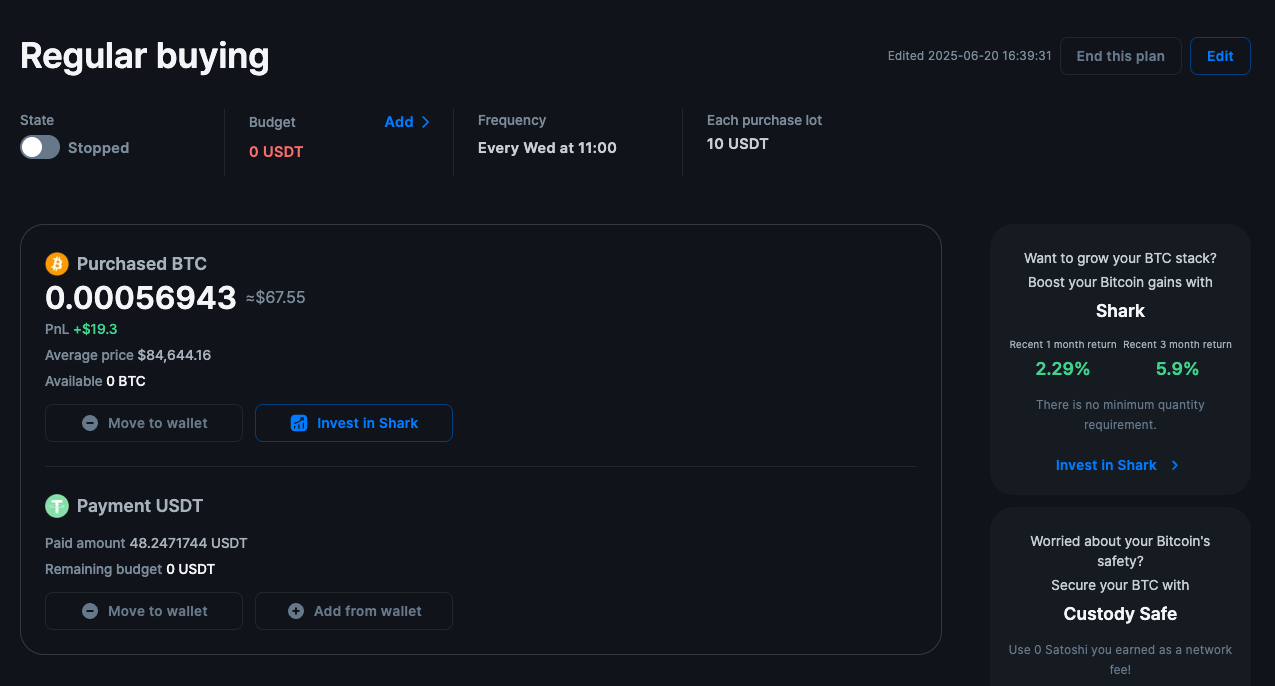
This screen helps you track and manage your Regular Buying strategy. Here's what each section means and how you can use it:

<figure><img src="https://2260387934-files.gitbook.io/~/files/v0/b/gitbook-x-prod.appspot.com/o/spaces%2FMxPfaVCLU0Czhjxw23iD%2Fuploads%2FwGM8dHPlTgTbsG3wqpLW%2F%E1%84%89%E1%85%B3%E1%84%8F%E1%85%B3%E1%84%85%E1%85%B5%E1%86%AB%E1%84%89%E1%85%A3%E1%86%BA%202025-07-31%20%E1%84%8B%E1%85%A9%E1%84%92%E1%85%AE%205.16.08.png?alt=media&#x26;token=c43aebd2-b73b-4b5e-a199-f619ac3e8d25" alt=""><figcaption></figcaption></figure>

### 3. Details

#### 1. Top section : Plan Overview

<table><thead><tr><th width="140.4609375">Field</th><th>Description</th></tr></thead><tbody><tr><td>State (Plan on/off switch)</td><td><ul><li>This toggle lets you pause or resume your auto-buy plan.</li><li>When turned on, the system will keep buying Bitcoin at the schedule you've set.</li><li>When set to <code>Stopped</code>, no buys will occur — but your BTC and USDT stay safely held.</li><li><mark style="color:$success;">Use this if you want to temporarily pause buying without deleting your plan.</mark></li></ul></td></tr><tr><td>Budget</td><td><ul><li>This is total amount of USDT you've allocated to this plan.</li><li>If the budget runs out, no further purchased will be made.</li><li>You can click <code>Add</code> to top it up anytime.</li><li><mark style="color:$success;">Keep an eye on this to make sure. your plan has enough funds to continue.</mark></li></ul></td></tr><tr><td>Trigger price</td><td><ul><li>The condition that triggers an auto-buy. </li><li>Example: -15% drop from current price.</li></ul></td></tr><tr><td>Frequency</td><td><ul><li>Tells you how often the system will buy Bitcoin.</li><li>Example: <code>Every Wed at 11:00</code></li><li>This is part of your Dollar-Cost Averaging(DCA) strategy— buying regularly, regardless of market price.</li><li><mark style="color:$success;">Great for long-term investors who want to avoid timing the market.</mark></li></ul></td></tr><tr><td>Each Purchase Lot</td><td><ul><li>Shows how much USDT will be used per transaction.</li><li>Example: If this is 10 USDT, then every Wednesday the system will use 10USDT to buy BTC(as long as your budget allows).</li></ul></td></tr><tr><td>Edit / End this plan</td><td>Options to update or end the current plan</td></tr><tr><td>Edited date</td><td>Shows the last time this plan was edited.</td></tr></tbody></table>

#### 2. Purchased BTC

* Bitcoin You Own Through This Plan
* Displays the total amount of BTC you've accumulated from this plan.
  * Value: Current market Value of your BTC
  * PnL (Profit & Loss):
    * This shows how your BTC has performed since it was purchased. It compares your average buy price to hourly market price, updated regularly.
* If it's green and positive, your BTC is currently worth more than what you paid.

<table><thead><tr><th width="149.78125">Info</th><th>Description</th></tr></thead><tbody><tr><td>Purchased BTC</td><td>Total Bitcoin acquired through this plan and its current value.</td></tr><tr><td>PnL</td><td>This shows how much your purchased Bitcoin's value has changed based on the latest hourly closing price compared to your average purchase price.</td></tr><tr><td>Average price</td><td>The average price per BTC for your purchases.</td></tr><tr><td>Available</td><td>Amount of BTC that hasn't yet been moved or invested.</td></tr><tr><td>Actions</td><td><ul><li><code>Move to wallet</code> :  Move purchased BTC to your SamshFi wallet.</li><li><code>Invest  in Shark</code> : Move purchased BTC to the Shark fund for yield boosting.</li></ul></td></tr></tbody></table>

#### 3. Payment USDT

| Info             | Description                                                                                                                                                                                     |
| ---------------- | ----------------------------------------------------------------------------------------------------------------------------------------------------------------------------------------------- |
| Paid amount      | Total USDT spent through this plan.                                                                                                                                                             |
| Remaining budget | Unused amount of the plan's budget.                                                                                                                                                             |
| Actions          | <ul><li><code>Move to wallet</code> :  Move unused USDT back to your SmashFi wallet.</li><li><code>Add from wallet</code> : Allocate more USDT from your SmashFi wallet to this plan.</li></ul> |

#### 4. Purchased History

<figure><img src="https://2260387934-files.gitbook.io/~/files/v0/b/gitbook-x-prod.appspot.com/o/spaces%2FMxPfaVCLU0Czhjxw23iD%2Fuploads%2FqIF7lHhrDdsYdtiKG4kp%2F%E1%84%89%E1%85%B3%E1%84%8F%E1%85%B3%E1%84%85%E1%85%B5%E1%86%AB%E1%84%89%E1%85%A3%E1%86%BA%202025-07-31%20%E1%84%8B%E1%85%A9%E1%84%92%E1%85%AE%205.17.33.png?alt=media&#x26;token=fed3fd0f-30ec-48da-a299-fc9ff045a125" alt=""><figcaption></figcaption></figure>

This table shows **every completed buy** under this plan:

* When the purchase happened
* How much BTC you got
* At what price
* And how much USDT was used

It helps you review your DCA strategy and track how consistently your plan has run.